Get your application in front of a person.
Seekvara scores every job against your resume, finds the recruiter or hiring manager with a checked email address, and writes them a personal note that you send from your own Gmail.
Free to sign up and look around. No card needed.
From a job post to a conversation
Most applications are never read by a person. Seekvara helps you choose the roles worth your time and reach someone who can say yes.
-
See which jobs fit, and why
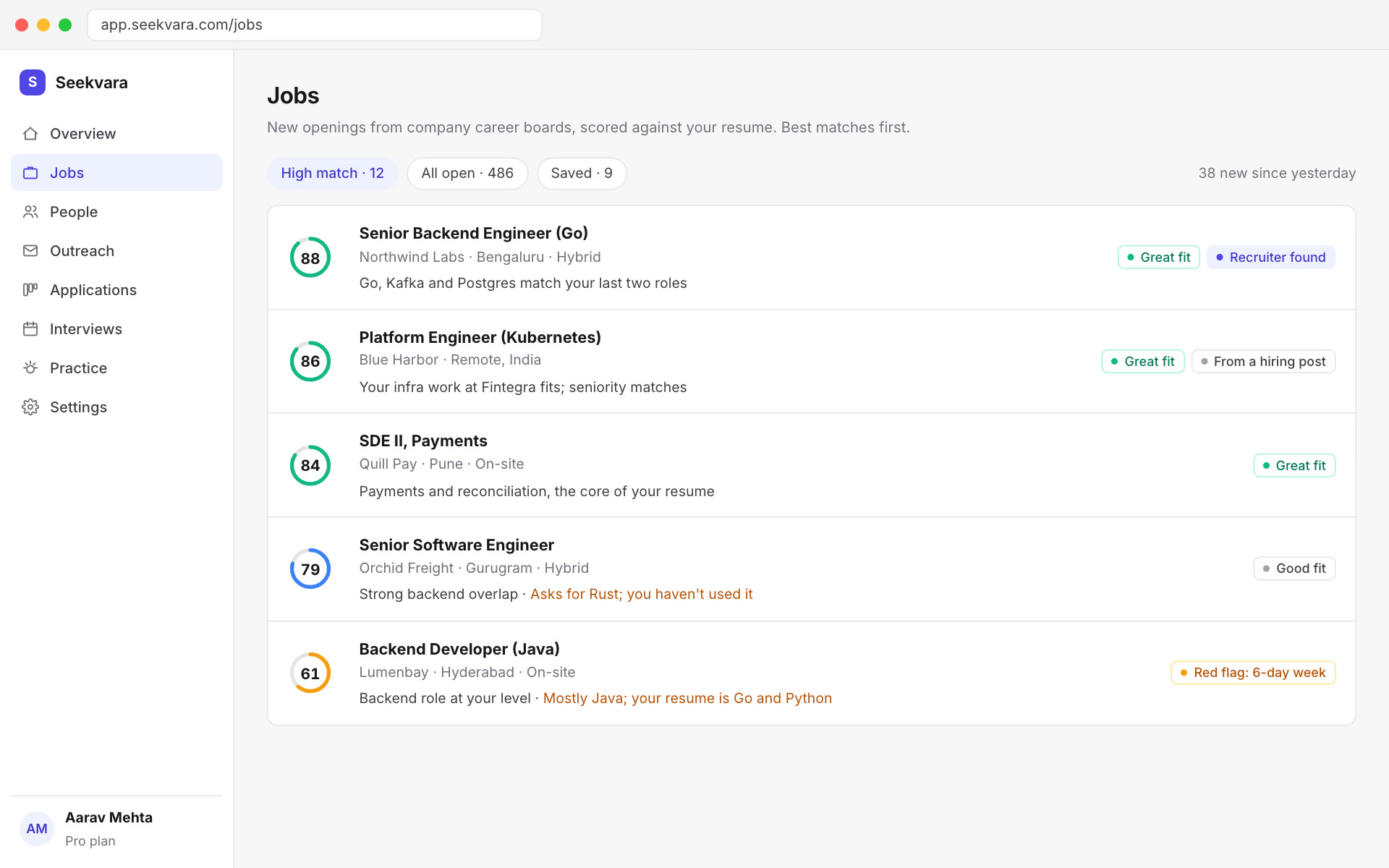
Seekvara gathers openings from company career boards and keeps one copy of each, even when a job is posted in several places. Every job gets a fit score against your resume, with the reasons, the gaps and any red flags in the posting.
-
Find the person who's hiring
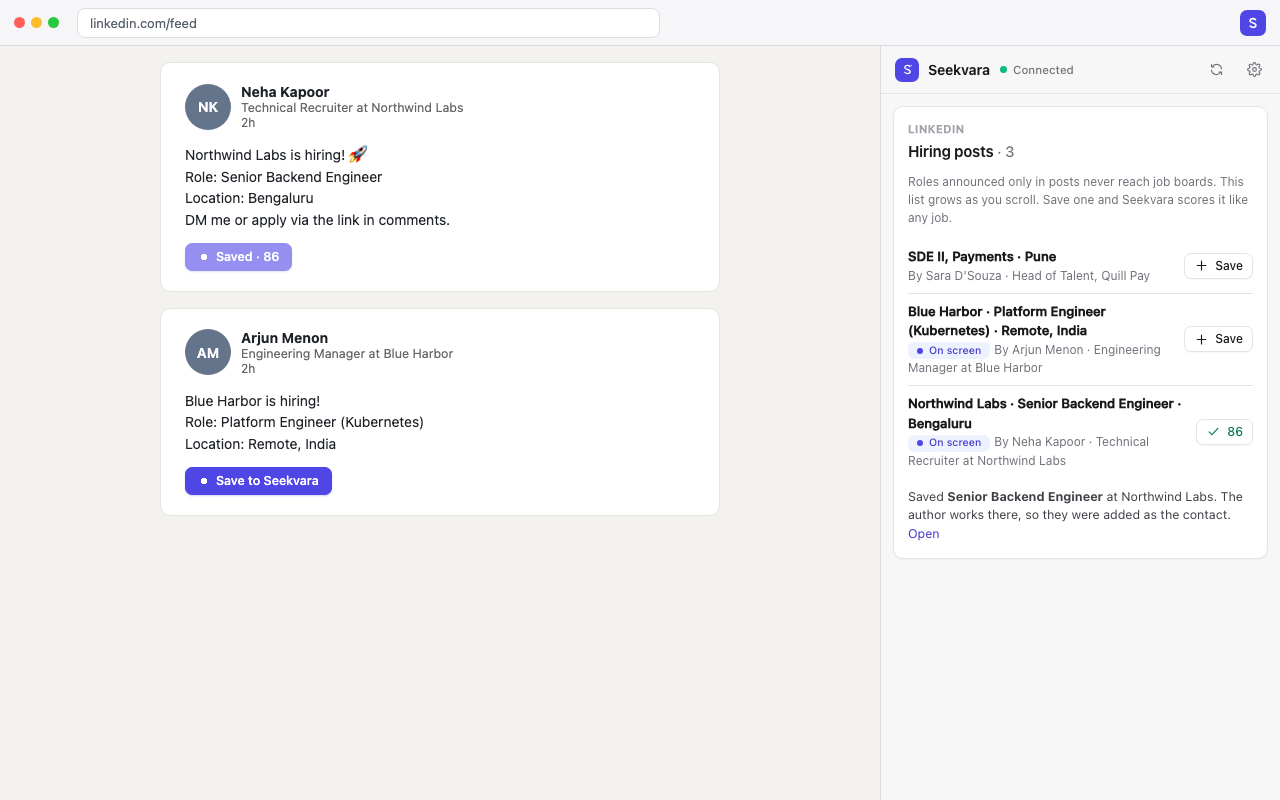
For each job, Seekvara looks for the recruiter and the hiring manager and checks their email address. You see how sure it is, verified or likely, before you write. Hiring posts you scroll past on LinkedIn are saved with their author as the contact.
-
Write to them, in your own words
Seekvara drafts a short, personal email from facts in your resume and the job post. Edit anything, approve it, and it goes out from your own Gmail. Every email waits for you unless you choose to send automatically.
A draft to the recruiter is written from the resume and the job post, approved and sent from Gmail, with a reminder set to follow up if there's no reply. -
Keep every application moving
Every job you're working on sits on one board, from saved to offer. Seekvara reminds you when a follow-up is due, and when you confirm an interview it can add it to your Google Calendar.
The Northwind Labs application is moved to Interviewing, and the confirmed technical round is added to Google Calendar.
Seekvara for Chrome works on the page you're on
Open the side panel on any job post, profile or application form.
- On a job post
- The fit score, the reasons and the gaps, the people to contact, and one click to save it or draft an email.
- On LinkedIn
- Jobs you've saved are marked in search results, hiring posts in your feed get a Save button, and on a profile you can find the person's email or write a connection note that fits.
- On application forms
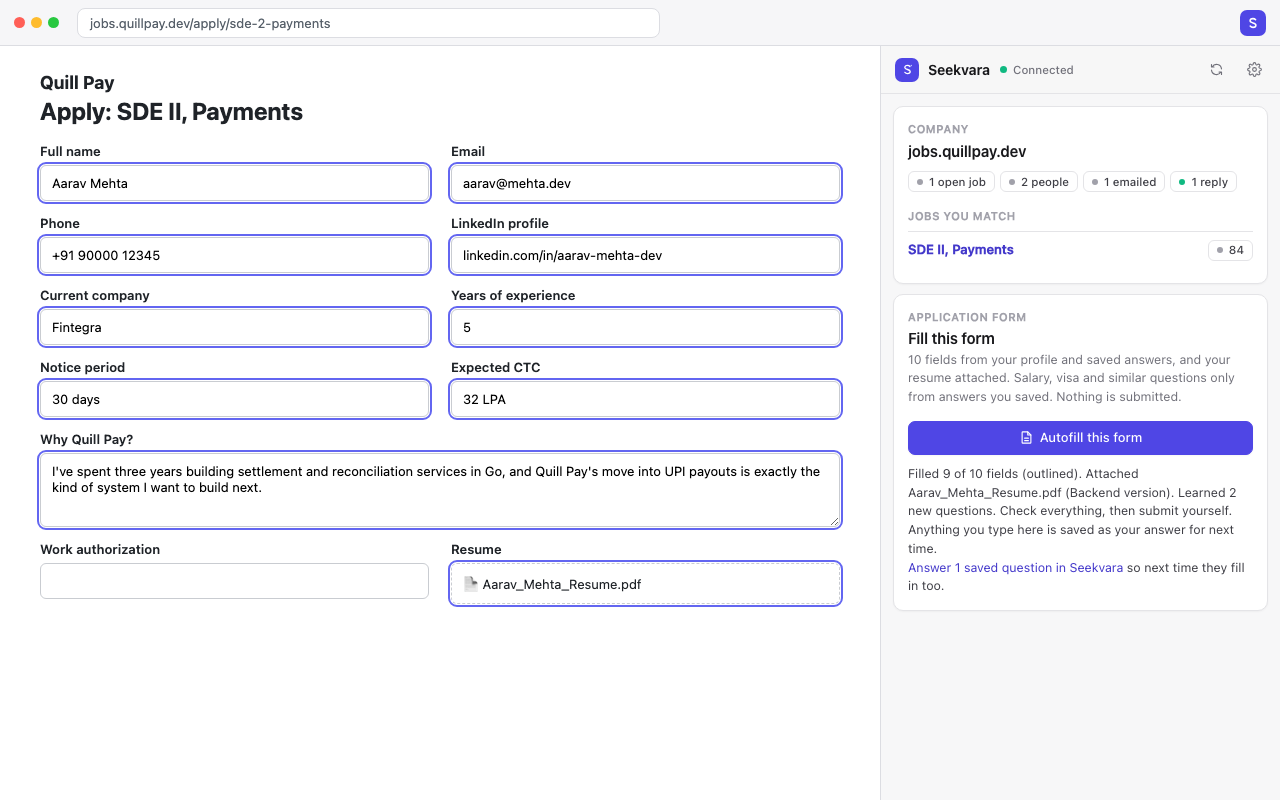
- Autofill enters your details and attaches your resume. Questions you've answered once are filled in everywhere. Salary, visa and similar questions are filled only from answers you saved, and nothing is ever submitted for you.
You stay in charge of what goes out in your name
- Your Gmail, your approval. Emails are sent from your own address and wait for you, unless you turn on automatic sending.
- Send permission only. Connecting Gmail lets Seekvara send email, and nothing else. It doesn't read your inbox.
- The page you choose. The extension reads the page you open it on, when you open it. It never browses, clicks or messages anyone by itself.
- Forms filled, never submitted. You check every answer and press submit yourself.
- Written from your resume. Every email is built from facts in your resume, and you can edit every word before it goes.
Free to look around. Pay when you're ready to reach out.
Sign up and explore for free. Choose a plan when you want to upload your resume, find people and send emails. You pay once for a month or a year, a year costs ten months, and nothing renews by itself. Prices are in Indian rupees.
Questions
Will Seekvara send emails without asking me?
No. Every email waits on the Outreach page until you approve it. If you'd rather not approve each one, you can turn on automatic sending, and you can read everything that went out under Sent.
Does Seekvara read my inbox?
No. Connecting Gmail gives Seekvara permission to send email only. Reply tracking, which would read replies to the emails Seekvara sent, is coming soon, and it will stay off unless you turn it on.
How does it find the recruiter's email?
It looks for the people hiring for that role and checks their address before you write. Each one is marked verified or likely, so you always know how sure it is.
Which job sites does it work with?
Seekvara finds openings on company career boards by itself. With the Chrome extension you can score and save a job from almost any posting you open, including hiring posts on LinkedIn.
Will it apply to jobs for me?
No. It fills in application forms from your profile and saved answers, then stops. You read the answers and submit yourself.
What does it cost?
Signing up and looking around is free. Plans are paid once for a month or a year, in Indian rupees, and nothing renews automatically. The current prices are on the pricing page.
Start with your resume.
Upload it, and Seekvara shows you which jobs fit and who to write to.
Start free